
DocsPeople and access
Temporary access
Ask for a role for a while, like production admin for two hours. Someone approves, and the access is removed by itself when the time is up.
Most people need powerful access only now and then: production admin during an incident, cluster admin to debug an upgrade. With temporary access, nobody keeps that access standing.
- Someone asks for a role, for a set time, with a reason.
- Someone else approves it.
- OpsNexa Online grants it on the platform, to the person’s own account.
- When the time is up, OpsNexa Online removes it.
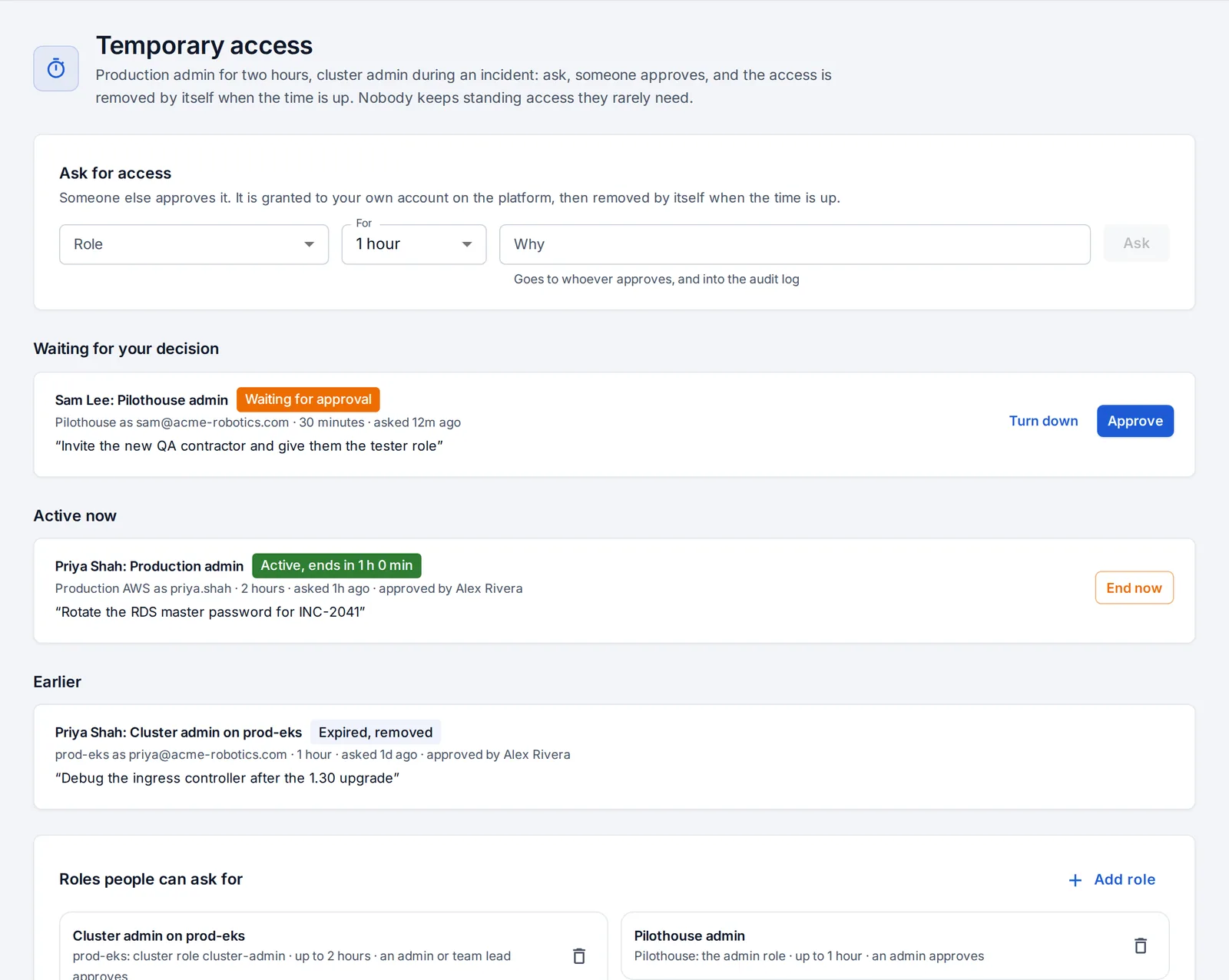
Roles people can ask for
An admin decides what can be asked for, under Temporary access → Add role.
| Platform | What is granted | How it ends |
|---|---|---|
| AWS account | Membership of an IAM group (like production-admins), or a managed policy attached to the person’s IAM user | Removed from the group, or the policy detached |
| Google Cloud project | A role (like roles/editor) for the person’s Google account, with a time condition | Google itself stops honouring it at the end, and OpsNexa Online removes the binding |
| Azure subscription | A role assignment (like Contributor) for the person’s Entra ID account | The role assignment is deleted |
| Kubernetes cluster | A cluster role (like cluster-admin), bound to the person’s user name (their email, as most clusters with single sign-on know them) | The binding is deleted |
| OpsNexa Online | The developer or admin role | The person gets their usual role back |
Each role has:
- a longest time, from 15 minutes to 7 days;
- who approves it: an admin, or an admin or a lead of one of the requester’s teams. The person who asked can never approve their own request.
Ask
On Temporary access:
- Pick the role.
- Choose how long.
- Say why. The reason goes to whoever approves, and into the audit log.
- Press Ask.
Approvers get the “Someone asks for temporary access” notification. In the Slack app it comes with Approve and Turn down buttons. You can also ask from your AI assistant: “ask for Production admin for 2 hours to rotate the database password”.
While it lasts
- Active now shows each grant and when it ends.
- End now: the person can end it early, and so can an admin. It is removed at once.
- When the time is up, OpsNexa Online removes it within a minute. The person is notified when it is granted, turned down, ended or expired.
- Unanswered requests lapse after 24 hours.
- If a platform refuses to grant, the request shows why and nothing is granted. If it refuses to remove, the request shows why and a critical “Temporary access” notification goes to the channels that follow it, so someone removes it by hand.
Every request, decision, grant and removal is in the audit log, with who, when and why: the evidence auditors ask for about privileged access.
Something unclear or missing? Tell us, or press the ? at the top of OpsNexa Online for the guide and tours inside the product.